
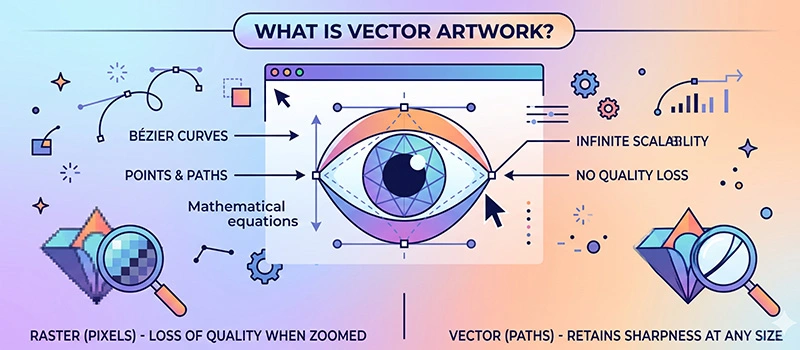
There is a basic difference between raster images and vector artwork. The difference gets visible when you try to enlarge the image. Raster images get blurry in a closer view. But vector images stay the same in any condition. What’s the reason behind that?
The quality of an image depends on how it is made. Most of the images we see daily are raster-based. Those images are made with pixels. If you’re dealing with logos, printing, and branding materials, you need to use vector format. Artwork Vectorization will help you.
What Is Vector Artwork?
Vector artwork is a type of image made by using paths instead of pixels. A vector image is built with lines, curves, and shapes. Therefore, we can scale it to any size without losing quality.
You can enlarge a vector logo to any required size. If you put it on a large billboard, the quality will be the same. That’s the key reason vector artwork is so desirable in branding. The visuals look premium. Brands rely on vector artwork conversion.
What’s the Difference Between Raster & Vector?
Many people get confused about vector artwork. Raster images lose their sharpness when you zoom in on them. It makes the pixel visible. That’s the indicator of raster images. They are made of small squares called pixels. That’s why you can not use those images on a large display.
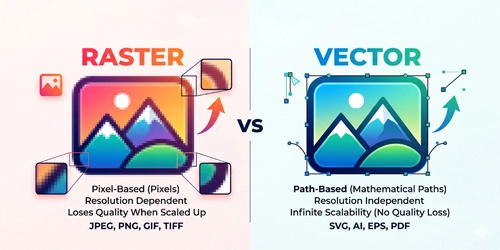
Vector images don’t have any quality issues. Vector designers create vector artwork using professional Vector-based software. They don’t depend on pixels. The image looks absolutely sharp in any view. It gives you infinite scalability. If you’re working with logos or printing, vector is the standard.
Why is Vector Artwork Needed?
Vector artwork is more than important for business professionals. If you’re running a business, selling products, and creating designs, vector artwork is the ultimate branding option for you.
Perfect Quality at Any Size
Images that we capture with our mobile phone are raster images. Those images are good for digital screens and small displays. If you create your logo in raster format, it will look blurry when enlarged. But you have to place it for different sizes. Blurry logos give a cheap vibe.
Print-Ready File
Printing people ask for vector files. There are specifically “Print Ready” options available for vector files. You just get the vector file ready and send it for printing.
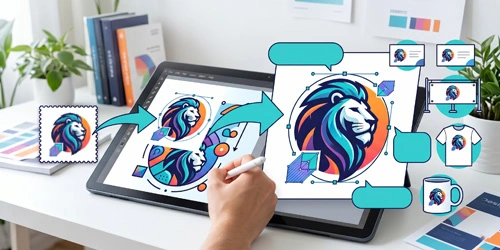
No modification is needed. Raster images won’t give you that flexibility. It saves your time and effort.
Easy to Modify
Business identity files, such as logo, business card, banner, flyer needs constant changes. You may need to change color, size, and shape. Vector files make it simple. You just need to open the file in Illustrator. You can easily change the size and color with a few clicks.
Professional Branding
Blurry graphics give the wrong signal for any business. Blurry images look unprofessional. When someone looks at the business visuals, they will have a negative perception of your brand. So, what is Vector artwork? It’s the standard option for professional branding.
Uses of Vector Artwork
You’ll find vector artwork in almost every professional design you see. The most common uses are:
- Business logos
- Business Cards
- T-shirt Designs
- merchandise designs
- Screen printing artwork
- Banners
- Flyer
- Signage
- Embroidery designs
- Stickers and labels
How to Check Your File Is Vector or Not?
At this stage, you know what is vector artwork. You might not be sure what type of file you have. Don’t worry, you can easily check if your file is vector or not by following some simple steps.
Check the File Format
AI, EPS, SVG, and PDF are popular formats for vector images. If you notice that your file has any of those formats, chances are high that you have the vector format.
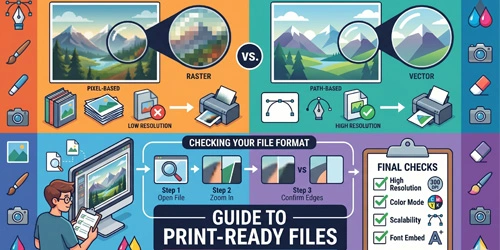
On the other hand, JPG, PNG, and GIFs are raster file formats. Don’t make the conclusion right now. We have to do the Zoom test.
Zoom Test
Open your image and zoom in closely. Does your image get blurry? If the answer is yes, it is a raster image. If the quality stays the same after zooming in, it’s an indicator of vector format. With this step, you can get confirmation about the image type. Do you want to do another test? Well, you can open the image in Illustrator and edit it.
Can You Convert Raster Images to Vector?
Artwork Vectorization is a top-rated raster-to-vector image conversion company in the United States. There are two main ways to convert raster images to vector. Those are Automatic Conversion and Manual Vectorization. The quality of the vector file depends on the conversion method.
In Automatic Conversion, the software traces the image quickly. The result is inaccurate. Manual Vectorization is the best approach. An expert designer recreates the artwork carefully using professional tools. This produces the precise results. We provide the manual vector conversion. The quality is top-notch.
When To Get Professional Vectorization?
- To get rid of a low-quality logo
- To fix the image gets blurry when resized
- Make artwork ready for screen printing
- To upgrade old designs
- Your printer requests a vector file
Sum Up
Hopefully, you don’t have any confusion anymore about what is vector artwork.It’s the foundation of professional-quality visuals. It helps your image to be resized, printed, or used for branding without quality compromise.
Unsure about the image type? You can easily check it by following our methods. It can save you from printing errors, wasted money, and disappointing results. Do you need a print-ready vector? We’re available 24/7 to assist you. Contact us now.
FAQ’s
What does vector mean in art?
In art, vector means the image is created using lines, curves, and shapes. This allows the artwork to resize to any size without losing quality. Vector art is widely used for professional branding.
How do I convert an image to vector art?
You can convert an image to a vector in two ways. The first method is automatic tracing using AI tools. The second method is manual vectorization. This method gives the best results.
Can AI make vector art?
AI can create vector artwork but you have less control over the outcomes. It can help you with ideas, concepts, and instructions. To create actual vector files, you’ll need to do it manually using professional vectorization software.
How is vector art made?
Vector art is made using graphic design software based on shapes. Instead of drawing pixel by pixel, the design is built with paths. That’s why vector art doesn’t lose quality.